
Acidlab Autobot live improv demo
Live improv over a new Reverb And The Verse song.
This is meant as a demo video for “tap write mode” on the Autobot, which I can see using on lots of future tracks. This thing has totally changed my feeling towards my euro-rack, in that its now really inspirational tonally. Before, it was mostly an afterthought.
The Acidlab Autobot is a 303 sequencer for eurorack; it has no sound of its own. It is driving a Cwejman VM-1 on really basic settings using a lowpass and a Sawtooth wave. The cv/gate are driving the Cwejman, while the Accent out is sent to filter frequency.
I have intentionally turned down the song to showcase the Autobot better.
Signal path: eurorack to Speck Xtramix to RME Fireface 800.
Popular iOS app NanoStudio now as a free version on Mac OS X
Blip Interactive has released a Mac OS X version of its popular iOS virtual studio, NanoStudio.
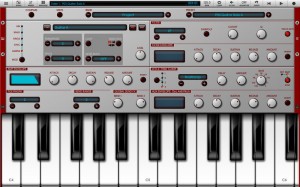
NanoStudio, the award winning music production app for iOS, is now available on the Mac App Store! Transfer your NanoStudio projects between iOS, OS X and Windows to make music wherever and whenever it suits you. Made a banging tune on your computer and need to go out? Email it to your phone and just carry on where you left off! NanoStudio has virtual analogue synths, sample trigger pads, a comprehensive sequencer, a sample editor, a mixer and multiple effects all integrated into a single application. Record your ideas in real time, mix synth layers with samples, compose and arrange your tune using the powerful sequencer and bring the mix alive with effects such as reverb, compression and EQ. Transfer projects between your computer and your iOS device, or use NanoStudio’s comprehensive audio mixdown options and export features to get your ideas over to your favourite desktop DAW.
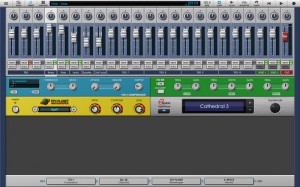
Key Features:
- NanoStudio has virtual analogue synths, sample trigger pads, a comprehensive sequencer, a sample editor, a mixer and multiple effects all integrated into a single application.
- Record your ideas in real time, mix synth layers with samples, compose and arrange your tune using the sequencer and bring the mix alive with effects such as reverb, compression and EQ.
- You can transfer projects between your OS X or Windows computer and your iOS device, or use NanoStudio’s audio mixdown options and export features to get your ideas over to your favourite desktop DAW.
Other features:
- Eden synth (also plays samples) – single or dual keyboards, XY controllers, pitch bend and accelerometer control
- Sequencer with up to 64 tracks and a piano roll editor for note, velocity and controller events, all with undo/redo
- TRG-16 sample trigger pads
- Sampling and resampling, sample editor and effects processor with undo/redo
- Mixer with 4 inserts per channel, 2 global send busses and volume/pan automation on every channel
- Transfer samples, final mixes and individual track mixdowns to your Mac/PC using NanoSync or email
- MIDI input
- Built in help
It’s free – so check it out in the Mac App Store
Testing the Vemona Mono Lancet Analogue Monosynth
Background information:
Here is an in-depth look at one of my new favourite synthesizers.
I look at the oscillators, filter and LFO then play with the sounds.
Its a dual oscillator real analogue monosynth and its very fat when it wants to be.
Don’t expect any musical masterpiece in this video. I am simply demonstrating the sound and feel of it
No talking and no guides. You can see whats going on clearly.
Recorded in high quality but please excuse the harmonics when the resonance goes too high.Its very powerful on this synth and the sound card didnt like it.
If you like this kind of thing look at my other videos.
Hope this helps
Rob
Check out my opinions on this and other synths here:
http://www.robssynths.co.uk/
An 8-Step Sequence: Analogue Solutions Oberkorn & Telemark-K (Keyboard)
Here’s a quick video demonstrating an 8-step sequence using the Analogue Solutions Oberkorn analogue sequencer. Sequence reset is triggered via Gate X out.
Bass provided by the new Telemark-K keyboard while the filter is opened and closed by Oberkorn. Transposition is done via the TM-K (keys).
AS Quantiser also featured between the Oberkorn and TM-K.
John Foxx & The Maths – He’s a liquid
John Foxx & The Maths – He’s a liquid – Live performance
“Mole Vanvitelliana – Ancona 28.07.2012 Acusmatiq 7.0 . Concerto molto bello, un Foxx veramente in forma!!”


PixiTracker 1Bit
This is a special version of the PixiTracker designed for TRUE 1-BIT SOUND like on old microcomputers.
Android version: https://play.google.com/store/apps/details?id=nightradio.pixitracker1bit
iOS version coming soon…
Homepage: http://www.warmplace.ru/soft/pixitracker
Want to make a donation? http://www.warmplace.ru/donate
Tic Tac Beatz Electro and Drumatron for iPad
This is V1.0. Check out V1.1 updated version here http://www.youtube.com/watch?v=od6L3yJknzI
Also check out the “How to Save and Load” and V1.2 update video here http://www.youtube.com/watch?v=03ar3cdRPhI
A quick demo of this new Ipad app and what it can do.
8 tracks split into drums, bass, synth, chords and effects. Designed exclusively for electronic style music.
It is on the app store now and at a bargain price. More info here:
http://itunes.apple.com/gb/app/tictac-beatz-electro/id520672407?mt=8
Facebook page for this app:
https://www.facebook.com/TicTacBeatzElectro
Not just a super cool looking drum pad but a professional drum pad machine with almost all the drum sounds you would ever need and with lots of tweakablity. Almost 100 sounds to choose from ranging from rock and dance drums, bongos and maracas, special effects and more. You can edit each pad’s sound, level, pitch and decay. Store up to 4 custom drum kits. Velocity control on each pad depending on where you hit the pad. Ergonomically designed for either one-handed use or using both thumbs with ease. With visual feedback and lighting effects that add more enjoyment especially in the dark. Pad 3 is linked to pad 4 so you can mute an open high hat on pad 4 with a closed hat on pad 3 if you wish.
All sounds designed exclusively for this app and created from real drums and high quality drum synthesisers.
No latency. Any delay in this video is from the video/audio sync
Available here now!
http://itunes.apple.com/us/app/drumatron/id546175262?ls=1&mt=8
Cats Do Different Tracks – Live session on Loopseque
Cats Do Different Tracks live session on Loopseque.
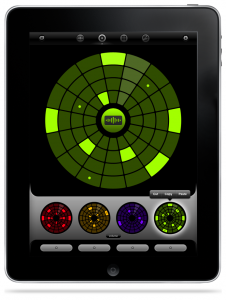
Loopseque it’s a new music ecosystem which includes powerful sequencer, sampler, fx processor and record store with many beautiful releases from talented artists.
The basement of Loopseque is a circle – a natural solution for visualization of cyclic music structure. Music starts with the first touch and within seconds becomes alive. It’s not just a rhythmic pattern in your hands, but the whole composition.
Playing Loopseque doesn’t require music education or any professional skills. An intuitive interface combined with inspiring sounds gives an opportunity to plunge into the world of music to everybody.
• Easy to use sequencer
• Sample editor, uploader & browser
• Onboard Samples library
• Audio effects
• Live track recording & loop bouncing
• SoundCloud sharing
• Project sharing via e-mail
• 22 professionally designed electronic sample sets
• 14 original project presets
• Loopseque Store with new projects and tracks by talented artists
• Dropbox Sync and iTunes File Sharing for your own sounds
• Audio copy/paste (General Pasteboard with import and export)
• WIST support for syncing with other iOS music apps
• Master Classes & Tutorials
Cubase – New book covers tracking audio, MIDI, and virtual instruments

Hal Leonard Books has published ThePower in Cubase by Matthew Loel T. Hepworth. They say that it’s a comprehensive, thoughtful, and engaging guide, written to help the new user master the ins and outs of Cubase. Here’s what they have to say:
Consider this: Cubase is a program that will turn your computer into a complete recording studio. That is, Cubase can create virtually every button, knob, switch, and fader found in a “real” studio, including a few components that don’t exist in the hardware realm. Imagine the challenge of sitting at a large mixing desk and being expected to use all that technology to produce professional recordings. Well, by installing Cubase on your computer, that’s exactly what you’ve expected of yourself. Knowing how daunting that task sounds, it’s easy to get overwhelmed, if not disillusioned.
The Power in Cubase: Tracking Audio, MIDI, and Virtual Instruments will help you get started so that you can use Cubase to your full benefit. It is specifically written to allow a new user to quickly get started with Cubase while avoiding a myriad of pitfalls. First, you’ll learn the process of installation and proper studio configuration. Next, you’ll learn the foundations of rudimentary Cubase operations. You’ll also learn how to avoid common mistakes that can ruin a recording. Finally, you’ll learn how to properly record MIDI, instrument, and audio tracks. Whether they’re your own tracks or those of a client, you’ll achieve recordings in your own home or project studio that were recently considered unobtainable without a big studio. And you’ll discover Cubase is easier to learn than you may have expected.
QuickPro Guides
If you want to quickly start implementing professional techniques into your audio recordings and productions, the Hal Leonard Books Quick Pro Guides are designed for you. These straightforward, task-driven, and easy-to-understand books cover music industry topics in a way that gets to the point and helps maximize your creative and technical accomplishments. The Quick Pro Guides are efficient and accessible, and the included DVD-ROM provides audio and video demonstrations of key QuickPro topics.
About the Author:
Matthew Loel T. Hepworth has been teaching music technology since 1984. He authors how-to videos on Cubase and Waveloab for macProVideo.com. He has also written Wavelab7 Power! for Course Technology PTR. He records, mixes, and masters audio projects for clients including Air Supply, FranklinCovery, Jonni Lightfoot, and many more. Hepworth also consults with several pro audio manufacturers like Steinberg North America, Yamaha Corporation of America, Lexicon, and Tascam. He is a video producer and photographer, and in his spare time, he plays bass guitar and Theremin in his band, ZenTherStick. He lives in Salt Lake City, Utah.
Pricing and Availability:
$16.99
More information:
TM404 – 303/303/303/303/606
TM404 provides some nice electronic sounds. PS. TM404 is the alias for one of Sweden´s top electronic musicians 😉
Background data:
If you dislike this, you might also dislike:
http://www.youtube.com/watch?v=ykcWdR-ewGw
http://www.youtube.com/watch?v=IaR7gVJn0t8
http://www.youtube.com/watch?v=CW4HOSBZ770
Some silverboxes from the early eighties.
FX:
Roland RE-201
Roland RE-501
Dynacord TAM-21
Dynacord SRS-56
Lexicon Model 200
TC Electronic D-Two
Empirical Labs Distressor
Tube-Tech SMC2B
DATAMASKIN

