
Arturia Microbrute sequencing Minibrute and eurorack modular drums on Maschine Studio
Background video information:
Just messing around with the new toy. I will have more detailed info up soon over at Fluxwithit.com
Don’t forget to sighn up for the free Newsletter to get FREE Maschine packs.
Robotic Drums – Drum synth with probability sequencer for iOS
Introducing Robotic Drums, a new Universal iOS app by Big Robot Studios.
Robotic Drums is a drum synthesizer with a probability sequencer.
It features:
– 6 analog-modeled synth voices with realtime control
– A probability sequencer for each voice
– Dropbox support
– Midi-clock sync support
– AudioBus support
– Quantized patterns switching
– An optimized, simple UI
For more info see: http://bigrobotstudios.com or find it on the App Store.
Midi Fighter Twister: Traktor Deck Drum Sequencer Demo
Sign up and learn more here: http://www.djtechtools.com/2013/11/03…
On the surface, each Midi Fighter Twister is equipped with 16 endless encoders, each with a push state, plus a full ring of LEDs. Capped off with 2 full-color LEDs at the bottom, each encoder can transform into a wide range of displays and functions depending on the mapping, configuration, or page. This provides infinite levels of control with clear visual feedback similar to a touch screen, while maintaining the tactile feel of a real knob.
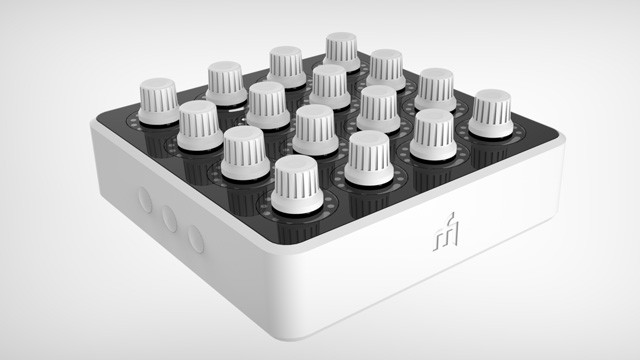
The possibilities – from Ableton control to Traktor effects – are endless, but to really showcase the potential of this dynamic work surface we decided to go a little nuts and create something totally next level.
Teaser for the new Intellijel Metropolis Sequencer
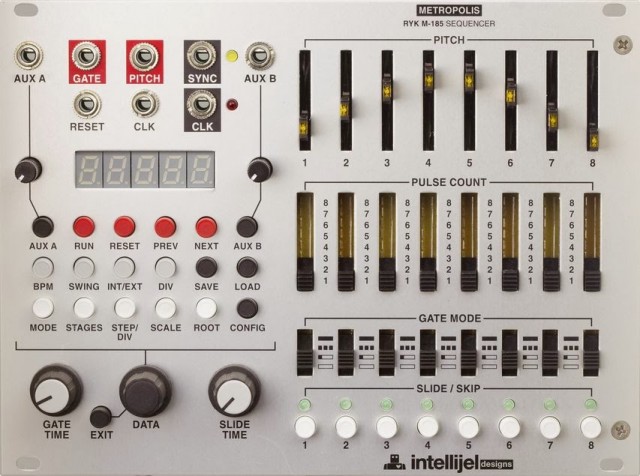
This is a teaser image of the Intellijel Metropolis Sequencer – a new Euro step sequencer, based on the RYK M-185 sequencer.
Features:
- Sequencer modes:
- Forward, Forward-fixed, Reverse, Reverse-fixed, PingPong, PingPong-Fixed, Random, Random-fixed, Brownian, Brownian-fixed
- TB-303 style slide (constant time portamento) with adjustable time
- Stage skipping (double click slide buttons)
- Internal quantizing with selectable scales and keys
- Can act as a master clk with BPM control or slave to an external (using clk src function)
- Save/load panel settings
- shuffle
- Internal clock divider
- Sync output (sets output pulse on last clock step of a sequence, used to slave other sequencers via reset)
- Two assignable AUX inputs which can control: gate length, transpose, key shift, root shift, sequence length, and step divisor.
- config menu to set slider pitch range, clock div type, clock offset
- tap tempo when in internal clock mode and tempo lock with bpm detect in external mode.
- All menu actions are one level deep. i.e. press the menu button and spin the encoder. There are no hidden levels or sub menus.
First go around with the Intelljel Metropolis. This is a pretty basic setup; I didn’t get into using the aux inputs to modulate things within the Metropolis. I’ll try that next! As you can see though, the Metropolis really lends itself to performing and improvising. Very hands-on and easy to go all sorts of crazy ways, melodically. Similar to the Rene, in that regard, but from a totally different point-of-view.
Patch notes. Pamela is sending clock to Metropolis, Trigger Riot, Modcan Dual Delay, and Sound of Shadows.
Metropolis is sending the same note info to three different oscillators. The third one going through a uScale first to create intervals. All going into the Dubmix. The Trigger Riot is controlling Tiptop drums, mixed through a VCA Matrix then an M277 for a little grit. That’s into channel 2 on the Dubmix, where I add a little Spring Reverb at one point.
The kik and snare are ultimately doubled with the Cwejman BLD and DPO. Lastly, I dialed into some sustained notes on the Pressure Points and a Modcan Triple OSC. The uStep is advancing the Pressure Points.
I had some troubles with the Trigger Riot losing sync when I would change presets. I’ll have to delve into that some more.
Modular Sequence: MFB Urzwerg controls MFB Microzwerg
Pure Analog sequence & sound, CV 1 and Gate 1 from the Urzwerg controls the VCOs of the Micro Zwerg. LFO 2’s frequency is modulated by CV3 and later GATE3 from the Microzwerg. Headphones are recommended ;).
Modular Sequence by Tanzbär & Urzwerg
This time the only drum sound from the Tanzbär (which is mainly used as a CV sequencer) is the fantastic BD2, a 808 style bass drum. The other drum sounds are generated by the small modular system Tinysizer & the Mikrozwerg. Both synths are patched into each other. At the second half of the recording I am using LFO tool by Xfer Records to filter the VCO 2 of the Tinysizer.
Boomstar 4075 sequenced by Doepfer Dark Time
This is a demo of the Boomstar 4075 (ARP 2600 filter) being sequenced by a Doepfer Dark Time. Because of the nature of the demonstration, it could get a little boring during some sections. Pay attention to the subtle changes and you will be impressed. Stay tuned through the whole video to see how much range the Boomstars can cover. This is only a short segment as well, these synths are capable of much more. This is a Perfect Circuit Audio favorite of 2013!
Look out for another Boomstar demo coming soon, this time played by a MIDI controller.
Interfacing Roland SH-101 with Analogue Solutions Europa Sequencer
Background video description:
One of my subscribers needed help interfacing his SH-101 with the Europa sequencer. In this video, I demonstrate clocking the SH-101’s arpeggiator and internal sequencer to the Europa using one of its 7 drum triggers. In this instance, I used trigger “B” since it did not have a drum assigned to the MIDI note number on the Roland R-8M. First, I program a steady stream of eighth notes and then sixteenth notes. I also experiment with dropping various steps to create a pattern. The simple bass line used in this video is from a Novation BassStation rack synth. I added some delay to the 101 with the Lexicon MX400.
Next, I hook up a Roland MPU-101 MIDI to CV converter box to control the SH-101 from the Europa sequencer.
Lots of controls on this new vintage lead synthesizer and pattern sequencer
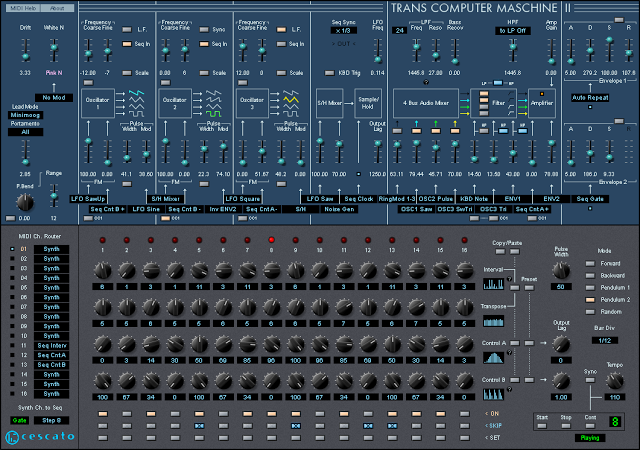
Trans Computer Maschine is a semi-modular Vintage Lead Synthesizer + Pattern Sequencer. Modeled after two legendary mono synths and a custom analog sequencer from Germany.
3 Multi-Oscillators with Sawtooth, Triangle, Sawtooth-Triangle and variable Pulse shapes.
Color adjustable Noise Generator.
3 mode Ring Modulator.
Advanced Sample/Hold.
Selectable 2/4-pole resonant LP Filter with auto-oscillation.
HP Filter with bus selection.
2 exponential Envelope Generators offering 3 operation modes.
Unique Sequencer features like ‘skip’ and ‘set’ can be played live from MIDI keyboard.
Inter-patch Sequencer pattern ‘Copy/Paste’ feature.
Fully MIDI controllable.
Fully VST automatable.
– Added ‘Drift’ control for subtle analogue detuning adjustment.
– Added ‘Noise Colour’ modulation from multiple sources.
– Added routing to use ‘S/H Mixer’ as OSC3 ‘Minimoog modulator’.
– Extended Envelopes ‘Attack’ range to 200µs.
– Fixed/added Oscillators self-modulation via ‘S/H Mixer’.
– Improved Amplifier featuring light distortion with clipping indicator.
– Remodelled Low Pass Filter feat. 3 modes with resonance ‘Bass Recover’.
– Remodelled Oscillators feat. accurate upper harmonics and isolated phase.
– Remodelled Ring Modulator featuring true Odyssey behaviour.
http://cescato.net/T-C-M-II.htm
DLD Technology releases the AS-16 Analog Sequencer Rack Extension
Introduction to AS-16 Analog Sequencer for Reason
Features:
- 16 CV channels with separate CV outputs
- Skip, Jump and Pad features for each channel
- Unipolar, Bipolar and Note output modes
- Common musical scales, with selectable root note via UI or MIDI
- Octave and range controls when in Note mode
- Normal, One Shot and Random modes
- Selectable slide
- Pattern reverse and bounce modes
- Synchronise with sequencer, external clock or free run
- Swing control
- Audio envelope and chopping facility
- CV add and multiply
- Chaining of devices for unlimited channels
Pricing and Availability:
€ 25.00
Available in the Propellerhead shop.
DATAMASKIN

