
Arturia V Collection 3.0 – The ultimate collection returns!
All you can eat analog sounds 
We are introducing a new movie to celebrate the release of the V Collection 3.0, which includes no less than 10 of our finest software instruments. You will be able to witness the off-beat and sometimes surreal world of Wayne, a young aspiring producer, and follow him in his quest to the ultimate sound.
The Klirrfaktor: Modular System & VoiceSynth
Without us getting into any political debates and thunderstorms – Klirrfaktor provides some nice shots of their modular system in tribute to Pussy Riot, check it out:
Free Pussy Riot!
Feel free to share this video – the girls from Pussy Riot need all our support!
Anybody out there who wants to make a better vid? Contact me here or on twitter @p0litix or @TheKlirrfaktor
All Sound from my little Modular System.
Vocoder-Sounds with Blue Baby Bottle + Qneo Voice-Synth.
Drums with MFB Schlagzwerg triggered by Elektron Octatrack.Hires-Photo and download here: http://www.klirrfaktor.com/tracks/the-klirrfaktor-free-pussy-riot
A late night iPad ReBirth Jam
Jamming with ReBirth for iPad. Two TB-303s, a TR-808, a TR-909 and various effects, all in one App with a pretty nice interface
Description:
ReBirth is back! Propellerhead Software’s legendary Techno Micro Composer has been resurrected and customized for the iPad. ReBirth faithfully emulates dance music’s three backbone devices: The Roland TB-303 Bass synth and the Roland TR-808 and 909 drum machines. Combine these with FX units, fully featured pattern sequencers and a gorgeous-looking interface and you’re ready to make killer tracks on your iPad. Share your music with friends on Facebook, Twitter and more using the built in sharing features.
Features
2 x TB-303 Bassline Synthesizer with pattern sequencer
The original Acid House and Techno bass synth. Unrivaled power, unmistakable sound.
TR-808 Drum machine
Roland’s sub-heavy 1980 beat computer. Instant hip-hop.
TR-909 Drum machine
The go-to beatbox for everything House and Techno. Press play and you’re dancing.
Tempo-synced digital delay
Bouncy and hypnotic, always in time with your music.
Compressor with threshold and ratio
A bare-bones compression unit for added beefiness.
Distortion unit with amount and shape
Raw and rugged distortion for that extra edge. Works wonders with any 303 bassline.
PCF effect
Pattern controlled Low-pass / Band-pass filter – a tweaker’s delight.
Mixer
Device specific mixer sections with pan, delay sends and FX switches
Mod support
Includes 7 original user mods with alternative sound sets and graphics
Sharing features
Share function with easy publication of songs to Facebook, Twitter and other social networks.
The popular Alloy mixing suite gets a major update

iZotope has announced the first major update to its Alloy mixing tools suite, since first introducing it in 2009. With Alloy 2, mixers can experience a number of new sound shaping capabilities, as well as improved ergonomics, low CPU usage, and zero latency operation. First time customers of Alloy have a limited window to get a significant discount. Alloy 2 will be available for $149 until September 6, 2012 after which, its suggested retail price will be $199. (iZotope customers who purchased Alloy 1 on or after June 27, 2012 will receive a free upgrade to Alloy 2 upon release, and a special upgrade price of $79 will be available for all Alloy1 customers who purchased before June 27, 2012).
Alloy is an advanced mixing suite that combines six essential tools in one self-contained and completely configurable plugin. Applications abound for mixers, producers, remixers, and post/broadcast professionals. Plugin formats include Pro Tools 7.4+ (RTAS/AudioSuite), AAX, VST, VST3, Audio Unit, and DirectX.
“A modern twist on classic mixing, Alloy 2 takes the traditional channel strip and brings it into the future with powerful sound-shaping tools, exceptional sound quality, and a streamlined workflow. Thoughtfully designed for mixing purposes across the music, audio, post and broadcast industries, Alloy 2 is perfect for engineers, musicians, and producers looking to sculpt their sound while addressing common mix issues.”
Key Features
Get six powerful tools in one integrated plug-in:
– Equalizer, Dynamics, Exciter, De-Esser, Transient Shaper and Limiter
– Achieve exceptional sound quality, balancing vintage emulation with digital precision Hear results immediately with zero latency performance, whether tracking in real-time or in the midst of a mix session
– Visualize mixing decisions with rich meter displays to guide the way
– Start fast, then go deep with over 250 presets and a tweaker’s paradise of advanced controls.
What’s New for Alloy 2?
Fans of Alloy 1 will benefit from Alloy 2’s sonic enhancements, highlights of which include a redesigned Exciter module, a revamped multiband Transient Shaper, a host of new EQ filters, including Treble and Bass Baxandall filters, and more. Alloy 2 users will also click less to achieve more thanks to both a fully overhauled user interface, enlarged to make more controls accessible, and a new Overview panel that dynamically adjusts to show only the most relevant settings of the modules in play.
With low CPU usage and zero latency operation, Alloy 2 can be used again and again across a wide range of tracks and buses, making it a perfect mixing complement to iZotope’s flagship mastering suites, Ozone 5 and Ozone 5 Advanced. To this end, Alloy 2 also features an internal Meter Tap, which provides immediate visual feedback from Alloy 2’s tracks and buses in the Ozone5 Advanced Meter Bridge.
Taking a closer look at the russian Formanta Polivoks Duophonic Synthesizer
The Polivoks is the most popular vintage Russian synth made in the early 80’s and it was among the first synthesizers produced in the USSR. It’s purely analog with two voices of polyphony, two oscillators each with triangle, square, saw, two types of pulse waveforms and one noise generator, the levels of which are controlled via the internal mixer. Although the oscillators can become unstable and difficult to tune, the Polivoks is well suited for making screeching sounds and thunderous bass. You can also connect an external audio input for processing through the Polivoks’ switchable dual-mode band pass/low pass filter and LFO sections. The LFO, or “Modulator” offers triangle, square, random and noise waveshapes and can be applied to the oscillator level and pitch or the filter cutoff. There are also two ADSR envelopes for contouring the oscillators and filters.
Polivoks had been produced since 1982 by the Formanta electronic factory (one of the biggest at the time); it was sold exclusively in the USSR. Polivoks has its own unique electronic components including a reliable keyboard (49 notes F to E) made with magnetically controlled contacts. Its synthesis modules consist of independent circuit boards, which is convenient for maintenance and repair. In addition, Polivoks is housed in an original rugged aluminum body of uncommon design with handy controls.
“Here is a Russian Formanta Polivoks Duophonic Synthesizer that was recently in for repair at The Analog Lab in NYC. It is a harsh sounding nasty beasty. Its basically impossible to get a sweet sound out of this thing, so we decided to go with a brash piece by Modest Mussorgsky…Hooray Russia! The guts of this thing are also pretty solid. Soviet era parts all over the place with plug-in circuit boards. The schematics for this synth are actually pretty decent. Strange grounding system and output connectors. The Polivoks just feels cheap, like you might break it by playing it, but damn, it can get in your face!”
www.theanaloglab.com
New stuff: Punch Evolved compressor VST

Minimal System Instruments releases Punch Evolved compressor VST for Windows
The original Punch compressor is one of Minimal System’s most popular and respected plug-ins and is an up-to-date version of one of the all time classic analogue compression and limiting processors, the 1176AE. They say that the new Punch Evolved plug-in takes this even further with a completely redesigned engine and the addition of new sound shaping features such as Mid/Side processing, EQ, and Gate sections.
Features:
- Ultra-fast attack time.
- Unique Analogue Modelled characteristics.
- FET Gain Reduction Emulation.
- Input & Output Gain Adjustment Knobs with adjustable Attack and Release Settings.
- An array of ratio’s including 2:1, 4:1, and 8:1 perfect for compression duties – but there is also the 20:1 ratio designed for full limiting applications.
- Mid/Side Processing.
- Gate with controls for Threshold, Attack, and Release.
- EQ with controls for Low/Mid/High.
- Custom Output Transformer Emulation design.
- Full automation capabilities.
- Flexible VU metering options.
- LED Visual Feedback.
- Professionally designed GUI.
- Fantastic Presets produced by Movie Iga and Kendal Osborne.
- Based on the 1176AE Limiting Amplifier Compressor.
- Fantastic on drums!
Pricing and Availability:
£19.99
Time machine – Sequential Circuits Pro-One
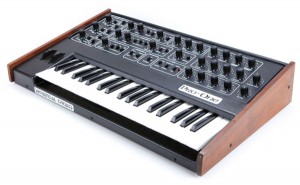
The Sequential Pro One is a wicked little monosynth! It comes from the same period and genre as the Roland SH-101 and Moog Prodigy. The Pro One was basically Sequential’s attempt at taking their legendary Prophet 5 poly-synth and packing it into a compact, inexpensive, monophonic analog synth! It has two VCOs, a great 4-pole lowpass filter, two ADSR envelopes (one for filter), and a compact three-octave keyboard. With a Pro-One, you can easily create punchy analog bass-lines and leads or quirky analog synth effects.
The Pro One is an extremely flexible synth with lots of modulation possibilities (ie: the filter, VCO B and LFO can modulate VCO A or B frequencies or pulse widths, or the VCF). There’s also an onboard sequencer, something common on many Sequential synths but not often found on other monosynths of the time. It is very basic, however, storing only two patterns and up to 40 notes max. Also, only pitch info is recorded (and in step time only); you can not assign a note duration to any notes. So it’s basically a short melodic sketch-pad…but useful. Also onboard is an arpeggiator which has UP and UP/DOWN patterns.
“A voyage into the heart of the SCI Pro-One from the year 1981. Exploration by Marko Ettlich
monophonic analog synthesis
2 Osc I Saw, Pulse, Square, Sync, Noise
Filter – 24dB lowpass
Crossmodulation, FM
step sequencer, arpeggiator
It has been used by Prodigy, Depeche Mode, Vince Clarke, New Order, Soft Cell, Sigue Sigue Sputnik and many more.”
Ableton Live Tips – Frequency Shifter for Analog Warmth
Solid as a rock – AfroDJMac on track with yet another Live session, check it out:
Learn how to use Ableton’s Frequency Shifter plug in to add some Analog style pitch imperfections to your instruments or entire tracks. Can be used to add tremendous amounts of character to your sound!
Full Post here: http://bit.ly/2mintip12
This 2 Minute Ableton Live Tip will show you how you can use the frequency shifter to introduce some subtle pitch movement, that emulates the characteristics of a more analog signal path. I’ve written about this before, but Digital music can be so perfectly in tune, which is not how acoustic instruments or analog synthesizers actually behave in the real world. Real instruments are almost never have perfect intonation, and a group of instruments can almost never be perfectly in tune with each other. Analog tape will also introduce some subtle pitch movement. Most of this stuff is more or less unnoticeable, but it does affect the overall sound and feel of the music. Enter Ableton’s Frequency Shifter Plugin. This gem can be used to create those slight imperfections on individual instruments or entire tracks.
Tuesday morning synth music featuring Psy’Aviah and Petition for Mercy
The Belgian electronic act Psy’Aviah have released quite a cute animated video for the track “On My Own”.
http://www.psyaviah.com – Music Video for the track “On My Own” (taken from the 2011 album “Introspection ~ Extrospection”) directed and animated by Emily Weeks (http://emilyweeksart.blogspot.be/).
“On My Own” is nominated for an HMMA 2012 award in category POP. We asked Emily Weeks to make an animated music video for this track based on her earlier work (e.g. her animated short “Sweater Wolf” @ https://vimeo.com/23228829, made during her time with the California Institute of the Arts). We love the distinct drawing style and her ability to tell a story using her animation skills, we hope you’ll enjoy this music video for “On My Own”, which is tightly linked to the meaning of the song.

Swedish small town popgroup from mid eighties.
Members:
Stubb, Anders & Richy
80s synth pop band with influences of mainly German and English synth pop masters.
petitionformercy.com
A Bit More Of Music box Composer
Create your own Music Box music, and easily share your compositions with others. Designed to aid composing your own music prior to punching the paper strips for Music Boxes, MBC allows you to compose, preview, play, save and share (via Twitter, Facebook, Email or iTunes file transfer) your creations.
For an example of a shared composition:
http://www.jellybiscuits.com/mbc/mbp.php?lL5nDF79
– Add, move, delete notes
– Disable Notes for temporary changes
– Multiple undo
– Ripple edits
– Save and Load (access the save location via iTunes File Sharing)
– Retina display support for the new iPad
– Sounds sampled from physical Music Box for added reality
The physical Music Boxes with the paper punch strips and are great fun – what I found was missing was an easy way to preview either transpositions or original creations. This aims to fill that gap but it’s also a fun music creation tool in it’s own right.
Tips:
– Notes are added/edited in either the lower or middle strip. Use two fingers to pan.
– Start with the ‘Add’ button, the tap in the lower strip view to set a note. Touch and slide your finger to add a note and adjust where it ends up – the note is played as you create/change pitch so it’s easy to get what you need.
– Use the zoomed in view to see what you are doing if you are adding in the lower strip. In the middle strip a zoomed in view pops up to the side (you can turn this off in the options).
– You can use the Add and Move modes together – it will then only add a note if it doesn’t find one near where you tap. With ‘Add’ only it creates regardless, but with both modes active you can add and adjust easily.
– Turn off ‘Snap’ mode to allow you to place notes between the vertical bars.
– The select mode allows you to swipe across an area to select, select a range to copy, control where the notes are pasted to, as well as simply being able to tap to select/deselect.
DATAMASKIN

