
Review of the Sketch Synth 3D v 1.0.4
Steelberry Clones got our hands on the newly released Sketch Synth 3D for a review (version 1.0.4). To best describe Sketch Synth 3D you can say that it is both a synth and a control interface that lets you shape and scalp your soundscapes in 3D. You can use it straight out of the box; but sketch synth also offers you the ability to extend and control your other synths in 3D using Midi output and OSC input & output. We made a short test run of the app on an iPad 2 featured in the video below:
Sketch Synth 3D has a quite different and “rough” UI that may take some time to get used to, but once you have gotten used to it, it is fairly easy to jump from different performance and editing modes. The sounds coming from the Sketch Synth 3D are quite intriguing and easy to manipulate. In one sense from a music creation perspective this app is somewhat what you could expect from an updated KORG Kaossilator. To draw sounds in 3D you can use a touchpad, accelerometers and automated envelopes. This gives you control over the shapes that your sounds take on. However, although beautiful and innovative we still feel that the app has some more steps to take before it is a viable alternative – especially seeing that the sketch pad tends to have glitches in the animation, we lack a sense of real flow in the animations. What is nice though is the ability to load samples and effectively manipulate otherwise fairly dry sounding sounds and take you music making to the next level – adding ambient feels to it. You can either use Sketch Synth’s sound engine to apply effects to samples (including wav files of your own), or you can use it to output OSC or MIDI to your existing synths.
Off Book: The Evolution of Music Online
As the 90s came to a close, the business of music began to change profoundly. New technology allowed artists to record and produce their own music and music videos, and the internet became a free-for-all distribution platform for musicians to promote themselves to audiences across the world. The result was an influx of artists onto the cultural scene, and audiences were left wondering how to sort through them all. In this episode we discuss these massive changes, and reveal how music blogs and websites have arisen as the new arbiters of quality.
Featuring:
Jon Cohen, Co-Founder, FADER Label
Ryan Dombal, Senior Editor, Pitchfork
Blake Whitman, VP of Creative Development, Vimeo
Anthony Volodkin, Founder, Hype Machine
Music by:
Flex Blur: soundcloud.com/flex-blur
Mindthings: jamendo.com/en/artist/mindthings
Dub Terminator: jamendo.com/en/artist/DUB_TERMINATOR
Nestor Gonzalez: jamendo.com/en/artist/Nestor_Gonzalez
Special Location thanks to Converse Rubber Tracks Studio
Artists from Music Video Section:
Rihanna – We Found Love – vimeo.com/33123323
Miss Eaves – Diva Pop – vimeo.com/34415367
My First Earthquake – We Float – vimeo.com/31941995
Moullinex – Catalina – vimeo.com/19723907
Sleigh Bells – Riot Rhythm – vimeo.com/16668477
Keep The Heat
Morning Teleportation – Expanding Anyway – vimeo.com/14304059
Da Silva – Les Stations Balnearies – vimeo.com/33569324
Goose – Synrise – vimeo.com/20913850
Tim and Puma Mimi – Perspective – vimeo.com/11742651
DYE – Fantasy – vimeo.com/30798517
Dan Wholey – Amateur Rocketry – vimeo.com/29672263
Health – We Are Water – vimeo.com/10818338
Colours – Colourfornia – vimeo.com/26906724
Dancing Pigeons – Ritalin – vimeo.com/13639493
The Naked And Famous – The Sun – vimeo.com/27790801
The Limousines – vimeo.com/18665622
Flying Lotus – Kill Your Co-Workers – vimeo.com/15568767
Follow Off Book:
Twitter: @pbsoffbook
Tumblr: pbsarts.tumblr.com/
Produced by Kornhaber Brown: kornhaberbrown.com
OP-1 as Control Surface for Reason
Teenage Engineering OP-1 meets Propellerheads Reason in a very short demo of the OP-1 / Reason control surface functionality.
Working with Reason 6.0.2, OP-1 OS #12234 and newer.
http://www.teenageengineering.com/
http://www.propellerheads.se/
Best Service has released Galaxy X Convolution Synthesizer
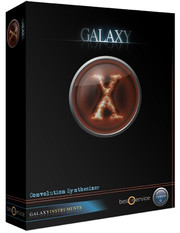
Best Service has announced the Galaxy X Convolution Synthesizer by Galaxy Instruments.
After three years of development Galaxy Instruments and Best Service proudly present GALAXY “X”, an exciting new virtual instrument with an extraordinary new kind of sound design: Effect Convolution. It all begins with the sources, which are sample sets especially and exclusively recorded and tweaked for use with FX Convolution: for X-KEYS hundreds of tonally playable instruments like piano overtones, a bowed fan, waterphone or mini-celesta, for X-FX thousands of effect sounds such as magic balls, whirling wood or circuit bent noises and for X-LOOPS exceptional loops such as 1-tone-drum, body percussion or rod spring piano.
But this is just food for the beast: the X-Engine.
With the X-Files of the X-Engine, a celeste mutates into a tuning orchestra, a bowed ventilator sinks into the resonances of a piano, a sitar smashes into a clatter of glass, a tonal dance loop arises from a kalimba.
X comes with over 1000 extraordinary ready to play key, FX and loop instruments and an extremely intuitive user interface, enabling you to create trillions of sounds easily.
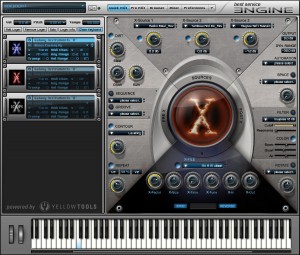
Galaxy X features
- Convolution Synthesizer.
- New sound synthesis for exciting new sounds.
- Integrated system for FX convolution in one virtual instrument.
- Complete production kit: X-Keys, X-FX and X-Loops.
- More than 1000 ready-to-play Instrument Layers.
- Easy creation of user sounds.
- 15GB of Source Sounds.
- More than 1000 multi-sampled Source Key Instruments.
- More than 5000 Source Loops.
- More than 2000 Source Effect Sounds.
- More than 1400 Convolution X-Files for completely altering the source sounds.
- Complex sound design with an extremely intuitive user interface.
- Easy dynamic use of convolution using the Mod Wheel.
- X-Eye for visualizing the amount of convolution.
- Musical and intuitive Pre-X and Post-X effects.
- Endless sound possibilities designed by you.
Galaxy X will be shipping January 2012 (release at NAMM show), priced MSRP 249 EUR / £219 GBP / $299 USD.
Elektron Trinity Techno Performances
Techno performance by Jimmy Myhrman on the Elektron Trinity (Machinedrum, Octatrack and Monomachine).
“This is a preview of an upcoming track (not yet released). I will add release info here as soon as it’s available.”
Done on the Elektron Trinity (Octatrack, Machinedrum, Monomachine) and some samples from OP1 – actually 90 percent of the material was sampled on to the Octatrack from the machines – it works amazing as a producing machine  Took around 2 hours to create the track but took longer to actually ‘perform’ it right and have the video looking OK.
Elektron Trinity:
Radical audio processing
The Octatrack is the given centre piece of the trinity. Since the audio outputs of the Machinedrum and Monomachine can be connected to the two input pairs of the Octatrack, no additional mixer is needed. The Octatrack can at the same time sample the incoming sounds, play back pre-recorded loops, add effects and in general radically process and bend sounds in any way imaginable.
The powerful rhythm section
Beats are taken care of by the Machinedrum. Five drum synthesis methods with detailed control of all parameters makes it right at home for all kinds of rhythmic material. The gritty 12 bit sample engine is especially suited for one shot drum hits and will make the UW samples stand out in any PA-system. The combination of drum synthesis and sampling equals complete drum excellence.
Sounds from outer space
The Monomachine is perfect for all things melodic. No matter if is about basses, leads or strange sounds: the flexible Monomachine sound engine can handle it all. The five different synthesis methods are the key. Imagine a sound and then create it in a few seconds with the help of FM synthesis, analog emulation, digital wavetables, SID chip emulation and speech synthesis.
Native Instruments Maschine – live Finger Drumming by DJ Seap
This video features a live performance by DJ SEAP (aka Nigel Sifantus) on the MPC inspired Maschine by Native instruments. There is no sequencing used. All sounds are created, edited and mapped by SEAP then played live “finger drum” style with no edits. Like many of the underground pioneers of finger drumming MPC players, Dj Seap is a Drummer, DJ, Producer with a background ranging from Jazz to Electronica to Metal. You hear all those influences here in this Dubstep inspired track.Equipment used: Ableton Live 8, Native Instruments Massive, the Mouth, and the Finger for sound design, Maschine for performance, and Izotpe ozone plugin for mixdown of the audio. favebook.com/djseap nigelsifantus.com twitter.com/nsifantus
Melodicon – Air-Powered Instruments Inspire New Synth
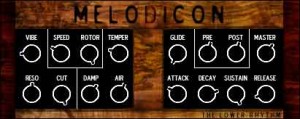
The Lower Rhythm says that Melodicon was designed from the ground up to be lush, subtly dynamic and just fun to play. Borrowing ideas from a number of different air-powered instruments, Melodicon creates tones reminiscient of everything from flute to melodica, presented in an analog synth / electric organ flavor. Melodicon features dynamic systems such as vibrato, rotary speaker, air and even a tube-emulated channel in order to allow the user to build many similar but distinct sounds.
Feature List:
- 2 oscillators (one Sine, the other experimental)
- Vibrato, rotary and modulation effect
- Variable “Air”
- Variable tube emulated channel
- Global LP filtering and master volume envelope
Pricing and Availability:
$13.99
More information:
NAMM – The new Traktor Kontrol X2

Here’s a new NAMM leak from Native Instruments of what have been called the Kontrol X2, a brand new controller from the Traktor team that features a 4×4 grid of true RGB pads. See the full photo above, as well as a nice mockup of the device made by one of a Traktor forum members over one year ago. Perhaps the most important element of introducing this type of controller is noting that Traktor Pro 2 currently doesn’t have any type of sampling capabilities that would make the X2 an effective controller.

This new Traktor version might feature enhanced sampling capabilities, including group loading of samples, the ability to assign colors to samples, cue points and maybe even keys. The original Traktor Kontrol X1 offers control over Traktor’s looping, syncing and effects. It has more of an emphasis on rotary controllers and cue/play controls. The new control looks like it may retain the same basic format as the Kontrol X1, but feature pad controllers. This would make it a nice complement to the original Kontrol and be a lot more useful for beatmaking and for performers that have more a clip-based approach.
NAMM – StudioConnect for the iPad

Griffin Technology has introduced an alternative to the Alesis IO Dock, the StudioConnect for the iPad.
StudioConnect adds audio in/out, MIDI in/out, and a stereo headphone jack with its own volume control.
It’s has a MSRP of $150, so it will give the IO Dock some competition on pricing, too.
Details below.
Audio in:
- 1/4″ mono
- 3.5 mm stereo
- Gain control
Audio out:
- Line-level stereo R and L RCA
- Front-panel 3.5 mm stereo headphone jack with volume control
MIDI in:
- 5-pin DIN
MIDI out:
- 5-pin DIN
For iPad and other iOS devices:
- 30-pin Apple dock connector with integral cable
- 30-pin Apple dock connector charge/sync cradle
Charging:
- 10 watts (5 volts DC @ 2.1 amps)
StudioConnect is scheduled to be released in February 2012.
DIY Orchestra plays Kraftwerk
In this video featuring hackmeopen rockit (lead), xoxbox (acidic solo), meeblip se (arpeggio) & shruthi-1 (bass)
DATAMASKIN

