
Red Bull BPM DJ Update 2.0 for iPhone and iPad
BPM DJ offers the 21st century digital equivalent of a professional DJ setup with 2 decks, 2 effect engines and a mixer. A high quality tool with focus on performance, low latency, usability and stability, designed for the real club’s DJ booth.
Official Website: http://redbullbpm.com
Facebook: http://facebook.com/redbullbpm
In this video we present the 2.0 version of the Red Bull BPM DJ app. The most notable changes include advanced technical as well as social features. DJ Julien Chaptal takes you by the hand, and explains Key Lock functionality, Slip Mode, improved tracklists, adjustable BPM Information and more high-tech coolness. Also, be sure to check out the all-new Deck Shark feature to hide your peak-time favourites from trainspotters.
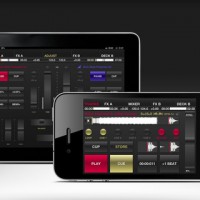
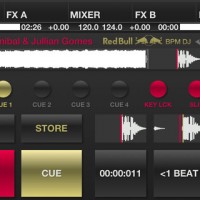
Specification:
Output modes for hardware mixer:
– Classic Club to use 2 iOS devices as separate decks, connected to your mixer. They sync the current BPM wirelessly.
– Double Deck to use one device, connected to your mixer. Audio left is deck A, right is deck B.
Output modes for the Split Cable Adapter (check djplayer.net to buy):
– Split Cable. Audio left is master, right is pre-listening.
– Ballroom. Same as before, but full stereo when PFL buttons are off.
Output modes with 2 independent stereo outputs:
– Home mode: audio out is pre-listening, master is transmitted to our MasterOut app over the network.
– Club Master: audio out is master, pre-listening is transmitted to MasterOut. A special design for ultra-low latency DJ monitoring.
Deck:
– 8 gapless cue/loop points (6 on iPhone and iPod touch), play like a sampler. Modify on-the-fly, while playback/loop goes.
– Vinyl Vision or waveform display, touch to jump (beat and block aligned).
– Pitch control (±4, ±8, ±16 and ±100%), fine adjust, adjustable pitch bend strength. Key lock in the ±16 range.
– Reverse play with slip mode for lengths below 16 beats.
– BPM sync, automatic bpm and beatgrid detection.
Mixer:
– Crossfader with 3 curves and attached morph filters.
– For each channel: fader, gain, low/mid/high ±6 db adjust eq, low/mid/high mixing eq from -96 to 0 db (isolator), hidden cutoff switches.
– Punch control for channel faders and cross (in/out).
– Calibrated channel and master VU meters (with peak hold off/fade/run), balance.
– Pre-listening: master/PFL ratio, headphone volume. Split or stereo PFL (in Home or Club Master mode).
– EQ reset on track load (do nothing, or reset all, or reset mid/high and cut bass).
– Gain set on track load (do nothing, reset to 0 or auto to loudness).
Effects:
– Adjust effect parameters with touch or accelerometer.
– Gapless auto or bounce looping, from 128 beats to 1/256 beat (including triolic 3/4, 1/3 values on iPad).
– Slip mode for looping.
– Temp pitch control, beat snap and reloop.
– BPM-based echo, reverb, lo-fi, flanger, highpass, lowpass, bandpass, notch and peak.
– Sharp or smooth echo/reverb release, beatcounter.
Tracks:
– Mass analyze of selected tracks.
– Convenient track search with textual search/filter.
– Sort by playlist, artist, title, comment, BPM or natural (“iTunes order”).
– Automatic marker shows if a track was played in the last 4 hours. Manual marker on/off for each track.
– Serato and Traktor metadata support (BPM and cue points/loops).
– The internal standard SQLite db keeps all bpm and cue points even if a track is removed from the device, with import/export.
Other:
– Automatically or manually post track information and camera images to Twitter.
– Day or night background. Manual or automatic according to your location’s sunrise/sunset.
– iPad only: CPU meter, sunrise and sunset display, live camera background.
– Audio buffer size, from 512 to 128.
MacBeth – test stylus keyboard
More from MacBeth:
Here is a very short video fearuring a small two octave stylus control keyboard! The outputs are Glide 1 (1v/octave), Glide 2 (1V/Octave), Standard 1VOctave, Negative (reverse going) 1V/Octave and finaqly +5V gate. The keyboard is driving the soon to be released MacBeth micromac analogue synthesizer. It’s a handy accessory for any modular synthesizer user! The copper plate that I’m using is highly reflective!
New material from synth legend Ryuichi Sakamoto, check it out
Sakamoto has always been a hero of ours and will always be up their amongst the other synth giants, although recent years (read 10+ minimum) his focus has been more to the classical side of things, apart from his worldwide reunion tour with YMO. This is a new collaboration with Willis, almost give me some Sylvian/Japan type flash backs, check it out
Find it in The Ghostly Store: http://www.theghostlystore.com/products/willits-sakamoto-ancient-future
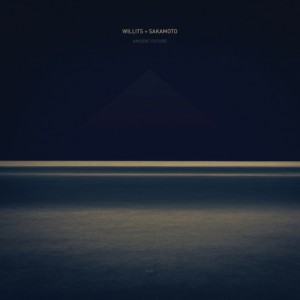
Tracklist:
01. Reticent Reminiscence
02. Abandoned Silence
03. I Don’t Want To Understand
04. Levitation
05. Releasing
06. CompletionAncient Future, available August 6th (EU/UK) and 7th (worldwide), is the second collaboration between composer and visionary pianist Ryuichi Sakamoto and electronic pioneer Christopher Willits. Built around a series of piano pieces that Sakamoto sent to Willits after the release of the duo’s first record together, 2008′s Ocean Fire, the six tracks that make up Ancient Future are entirely instrumental—and yet, they speak about the very essence of what it means to be human.
As a whole, Ancient Future functions as a piece about the creation, acceptance and completion of one’s fate and all of life’s experiences, following a trajectory through inner conflict, resolution and, ultimately, acceptance. The six-song cycle moves through a narrative of sorts, each piece with a story to tell and an aspect of life to explore.
The album opens with the restless energy of “Reticent Reminiscence”, an energy that subsides into the introversion of “Abandoned Silence” and “I Don’t Want to Understand” and, eventually, the cold disassociation of “Levitation”. A certain warmth returns with “Releasing”, its guitar arpeggios like washes of sunlight, and the album’s journey finally resolves into closing track “Completion”, a piece that’s full of quiescent tranquility, perhaps reflecting the experience of finally coming to know oneself.
Despite its conceptual coherency, contradictions lie at the heart of Ancient Future, as the album title might suggest. Even within the confines of each track, opposing forces are at play—loops of static and feedback provide the backing for delicate melodies that develop and evolve like ripples on a placid lake. And yet the contradictions never feel like conflicts—instead, the diverging elements come together to create something with its own internal logic, perhaps reflecting the way that we are all the sum of our experiences, both light and dark, positive and negative.
http://christopherwillits.com/
http://www.sitesakamoto.com/
Slash demos the AmpliTube app for iOS
http://www.ikmultimedia.com/slash for more information
Watch Slash use the official Slash app, AmpliTube Slash and walk you through the features while talking about how he used iRig while writing songs for his latest album “Apocalyptic Love”
Take it from Slash himself who said: “AmpliTube iRig comes in really handy for on-the-go practicing, recording, or just jamming on different ideas — even if it’s on the bus — it’s right with me all the time”, Slash adds, “I’ll do some tweaks on the Marshall’s, but there are also different effects that are available including distortion, chorus, auto wah and more.” IK Multimedia is proud to announce AmpliTube® Slash, the official Slash apps and software that let you play, practice and record with Slash’s signature pedals and amplifiers on the iPhone®, iPod touch®, iPad® and Mac®/PC. All versions of AmpliTube Slash feature models of the signature gear used by Slash in the studio and for his live performances. Now users can rock with models of the legendary Marshall® amplifiers used by Slash together with his signature guitar pedals. Also included is a comprehensive collection of Slash’s guitar tone settings provided as starting points for tone tweaking or playing along.
Available for iPad: http://www.ikmultimedia.com.com/products/slashipad
Also available for iPhone / iPod touch: http://www.ikmultimedia.com/products/slashiphone
Also available for Mac/PC: http://www.ikmultimedia.com/products/slashcs/
Additionally AmpliTube Slash provides a fully integrated multi-track recording studio for capturing ideas quickly and easily or producing entire songs and compositions (via in-app purchase on iOS versions). A robust song player section gives users the ability to play along with songs or backing tracks by importing them directly from their device library or computer.
AmpliTube 2.5 is a major upgrade for AmpliTube, the leading guitar amp and FX app for iPhone, iPod touch, and iPad. Together with many new features, it now also includes a NEW Recorder/Mixer.
* We have separated the recorder and mixer section for improved ease of use
* In the recorder module, you can now loop your songs (or sections of a song) with ease. Just set your IN and OUT points, then enable the loop feature by clicking the loop button.
* Now you can set the tempo of your song right from the recorder section by tapping the BPM button or entering a value.
* You can also enable the metronome, and — if you like — set it to Visual mode
* In the new Mixer section, all of your critical mixing controls are on one screen: the FX assignment, the REVERB send, PAN, VOLUME, MUTE-SOLO… and the track ARM and SELECT buttons.
* AmpliTube 2.5 also has a new audio “copy & paste” feature. Now you can copy and paste audio materials between AmpliTube and other apps like GarageBand, or simply Copy and Paste tracks from one to another within AmpliTube.
* Just select the track you want to copy, …tap COPY, select the destination track and tap PASTE.
* If you want to copy/paste your entire bounced song, go to the projects list, ..select the song, …and tap COPY. Now your song is on your clipboard and ready to be pasted into a single track in AmpliTube, or into other apps like GarageBand!
The Analog Lab NYC-Moog Modular-Holst | The Planets, Op. 32: I. Mars, The Bringer of War
Here’s a nice video featuring the Moog Modular, enjoy
This Moog Modular was originally owned by Gershon Kingsley and played at the January 1969 performance of the Moog Quartet. Over the years, it was also owned by Ken Bichel and has had numerous additional modules installed.
The Analog Lab in NYC has restored this piece to beautiful playing condition and the unit can be heard in all its glory in this video*. No additional effects were added.
This piece of Musical History is also for sale on eBay, so check it out!
www.theanaloglab.com
*editors note: I know some parts aren’t perfectly in tune…get over it.
Get the Arturia miniMoog for free on the 21st of June

Arturia has told us that they will be giving away for free a special version of Minimoog-V on June 21st Only.
Arturia’s agreement with Moog Music to sell a Moog-branded virtual instrument is ending, so they’re going to update and rename Moog Modular V and Minimoog V as Modular V and Mini-V.
The free version of Minimoog-V Original offers 1,000 presets and features from the latest Minimoog- V update (Version 2.5), but without the additional functionality accessible behind the ‘hinged’ front panel — just like the original Minimoog.
Jordan Rudess’ singing keyboard
Here’s Jordan’s comment about the video:
“After three days of experimentation, I was finally able to make my keyboard sing!”
Two new Reason Rack Extensions has been released

iZotope, Inc.has released the Ozone Maximizer Rack Extension for Propellerhead’s Reason.
iZotope says that the Ozone Maximizer Rack Extension is an essential mastering tool for adding fullness and polish to music produced in Reason. The original Ozone Maximizer has been used on countless recordings in varied genres like Rock, Hip Hop, Electronic, Classical and more. iZotope has now adapted this acclaimed technology for Reason, extending the Reason Rack with a versatile tool trusted by professional musicians and engineers worldwide.
“Many of us at iZotope have longed for the day that we could use more of our favorite production tools, like Ozone’s Maximizer, right inside of Reason. That day has come! Rack Extensions are a great solution for opening up the Reason rack to more world-class audio effects and instruments, and we are excited to be part of the launch with one of our flagship technologies.”
iZotope tell us that they have redesigned the Ozone Maximizer to perfectly complement the workflow Reason users know and love, making it an ideal addition to Reason’s Master Section. They say that, with iZotope’s exclusive IRC (Intelligent Release Control) technology, the Ozone Maximizer excels at boosting the overall loudness of a mix without causing distortion or pumping. This Rack Extension also includes iZotope’s MBIT+ Dither, letting users preserve the quality of Reason sessions when exporting audio for CD or MP3. iZotope says, with the Ozone Maximizer, users can give their mixes the final polish they deserve, without ever leaving Reason.
Mats Karlöf, Product Manager at Propellerheads, told us, “We are extremely happy to see iZotope, with their sense of quality and usability, inside the Reason rack. iZotope’s flagship technology, the Ozone Maximizer with its dithering function, have made Reason an even more complete end-to-end solution, helping people to put the finishing touches on their projects. I wake up every morning with a smile on my face thanks to the clever people at iZotope.”
Key Features:
- 2 Intelligent Release Control (IRC) limiter modes: IRC I and IRC II
- 2 low-latency limiting modes Hard(Brickwall) and Soft
- High-precision threshold control with integrated gain reduction metering
- Speed knob control for adjusting the character of the IRC Limiter from slow and transparent to fast and aggressive
- Variable Stereo Link control for independent limiting of left and right channels
- Inter-sample Limiting to predict when a digital signal might clip in the analog domain, and to automatically prevent these over’s
- Margin control for precise control of the output level, helping to dial back peak levels for better encoding to formats like MP3
- iZotope MBIT+ Dither for highest quality results when converting 24-bit Reason sessions to audio files with lower bit depths
Pricing and Availability:
iZotope Ozone Maximizer Rack Extension is available now for $79 USD.
More information:
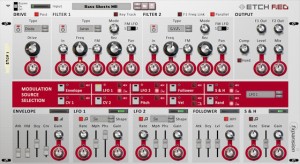
FXpansion has announced the release of Etch Red, an exciting and great-sounding filtering effect based on DCAM circuit-modelled technology, and now available as a Reason Rack Extension.
Etch Red’s dual filters feature realistic audio-rate FM, flexible routing and 4 filter models offering a total of 38 filter responses and allowing all manner of fat and warm subtractive tone-shaping. Alongside 3 classic synthesizer filter circuits, Etch Red also includes a stunning comb filter model for creating mind-bending psychedelic effects.
Additional distortion and compressor stages are provided for beefing up signals, and FXpansion’s TransMod modulation system lets you contort Etch Red’s circuits over time. Use inter-modulating LFOs, envelopes and more to drive the filter cutoffs, FM amount, distortion and compression amounts, panning, wet/dry mix and much more.
Etch Red contains a number of CV and audio patch-points for integrating its circuits into your Reason projects: feed in CV from elsewhere to modulate parameters or retrigger the on-board LFOs, envelope or the sample and hold. You can even send in any audio signal as an audio-rate filter FM source. The internal modulation devices are also exposed as outputs, so they can drive other Reason devices’ parameters.
Etch Red can do amazing things to all kinds of audio material and is great for subtle warming, deep tone sculpting, wild sweeps, special effects and experimental sonics.
Etch Red is available as a download-only product from the Propellerhead Online Shop, priced at $49 USD / 39 EUR inc. VAT where applicable.
Propellerhead has announced that Reason 6.5, Reason Essentials 1.5 and the Rack Extension Store are now available
Propellerhead has announced that Reason 6.5 and Reason Essentials 1.5 are now available. What’s more, the Propellerhead Shop, in which you’ll be able to purchase the heavily trailed Rack Extensions, is now open for business.

Updates to the new versions of Reason are free – full pricing details are below. Propellerhead’s Pulsar Rack Extension is free to everyone who upgrades before 30 September.
Reason 6.5/Reason Essentials 1.5 and Rack Extensions press release
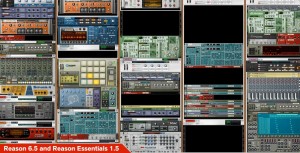
Propellerhead today released new versions of their award-winning music making platform: Reason 6.5 and Reason Essentials 1.5. New in these versions is the introduction of Rack Extensions—a groundbreaking new technology from Propellerhead that opens up the rack to third parties, enabling developers to create their own instruments and effects for Reason and allowing users to expand their collection of instruments and effects with the Reason devices they want.
Propellerhead has also opened the doors to the Propellerhead Shop—the central location for all Rack Extensions. All Rack Extensions are full Reason rack citizens, delivering the same ease of use and total integration as all other devices in the rack, including automation, unlimited undo and cables on the back as well as integration with Reason’s patch browser. In the Propellerhead Shop users can get fully functional thirty-day trial versions of all available Rack Extensions, downloaded and installed into the rack with a single click.
“Rack Extensions combines all the things that musicians love about Reason with the creativity and inspiration that comes from having tons of instruments and effects at your fingertips. And it manages to do all that without any of the drawbacks of old plug-in technology. It really is the best of both worlds,” says Ernst Nathorst-Böös, Propellerhead CEO. “Reason 6.5 is an incredible update to Reason, changing the world of music making on computers, again.”
Reason 6.5 and Reason Essentials 1.5 are available as free upgrades for all owners of Reason 6 or Reason Essentials version 1, downloadable from the Propellerhead web site today.www.propellerheads.se/download/reason-upgrade
To get people started, Propellerhead offers the Pulsar Rack Extension—a dual LFO and mono synth with plenty of character—as a free download in the Propellerhead Shop to everyone who upgrades before September 30, 2012: shop.propellerheads.se
UK Pricing and availability
Reason, Reason Essentials and Balance are available now for purchase at the following suggested retail pricing:
- Reason – £349/€405/$449
- Reason Essentials – £99/€120/$129
- Balance with Reason Essentials – £349/€429/$449 (Includes a free upgrade to Reason 6.5 for any registered Record or Reason owner)
- Reason Upgrade – £139/€149/$169 (From any Reason version, and Balance)
- Upgrade for Adapted/Limited/Essentials Owners – £229/€299/$329
AmpliTube for iPad, the mobile effects processing app, has been updated
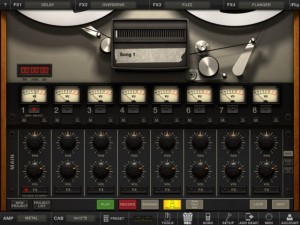
IK Multimedia has updated AmpliTube for iPad, its mobile effects processing app.
AmpliTube for iPad puts a guitar/bass rig at your fingertips, with 4 stompbox effects amp-head, cabinet and microphone. Choose from 11 built-in stompbox effects (delay, fuzz, overdrive, wah, envelope filter, chorus, flanger, phaser, octave, noise filter + distortion once registered), 5 amps (clean, crunch, lead, metal, bass) with full controls, 5 speaker cabinets and 2 microphones (dynamic and condenser).
AmpliTube for iPad 2.5 adds:
- Slash gear models available for in-app purchase
- New Mixer/Recorder section with loop points, visual metronome, tap tempo
- Digital audio in/out support
- MIDI support
- Audio Copy/Paste
- Retina display support
- Restore In-App purchases
- New export via SoundCloud and FTP
AmpliTube For iPad is $19.99 in the App Store.
DATAMASKIN

