
Deckadance Mobile for the iPad
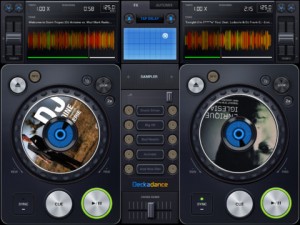
Image Line has released Deckadance Mobile for the iPad:
Load music from your iTunes library and mix, scratch or loop up a storm.
When you are ready to kick back, use the automix feature and let Deckadance mix up your playlists for you.
Key Features:
- Beat detection and autosync – Tap the SYNC button on a deck to sync its tempo to that of the opposite deck.
- Left / Right deck faders & Tempo control with nudge – Individual deck volume faders and X-fader.
- Cue points – Add up to 4 cue points per-track per-deck. Select CUES from the mode window. Tap Rec and a cue memory slot to save the current playback cursor position. Alternatively, with the track stopped press the CUE button to set a cue point. When playing the CUE button jumps back to the cue point and pauses.
- Automix – Select the AUTOMIX tab and music source to hear your selected music automixed.
- Equalizer – From the EQ mode window adjust Low, Mid and High equalization.
- Waveform view – Inspect beat alignment from the WAV mode window.
- Loop – After Deckadance mobile automatically detects the beat, from the mode window select 32 to 1/32nd beat loops and tap the Loop button on the deck to engage.
- Sampler – 5 assignable sampler slots per deck. Play from included sample libraries from the mode window.
- Play effects – From the mode window hold Stutter, Turntable, Censor, Break or (back)Spin to add the effect.
- X/Y effects – From the FX tab choose Ring-Mod, Lo-Pass, Hi-Pass or Tap-Delay effects and control them from the X/Y pad.
Deckadance Mobile is $3.99 in the App Store.
Swedish synth act Diskodiktator returns with an Elegant Machiner cover album

Diskodiktator’s Johan Billing has returned from the silent part of the world with a new musical project. Johan Billing did a full cover of the debut album from S.P.O.C.K last year. This summer it’s all about the first album by Elegant Machinery.
Billings vehicle for this project is again Diskodiktator Electric Orchestra with whom he is currently working on “Degraded Faces” bringing you 10 tracks of Elegant Machinery covers as you’ve never heard them before.
Listen to it here:
Monotron DUO electronic jam (monotron duo, CV sequencer, iElectribe)
Monotron DUO – using cv signals to control pitch and filter cutoff – using ribbon to control filter cutoff.
Sequencer based on Velleman MK107 led kit
(endless fun :D)
New bass synth coming to Reason 6.5 (Rack Extension)

AudioRealism has announced that it will be bringing ABL2 – a virtual Roland TB-303 – to Propellerhead Reason as a Rack Extension:
We are happy to announce our first Rack Extension for the upcoming Reason 6.5 release: ABL2 for Reason! Featuring the same 303-engine that ABL2 has. It does not contain a built-in sequencer, but works great with Reason’s Matrix Pattern Sequencer!
Disclaimer: This is a preview only, things may change for the final release.
Pricing and availability are to be announced.
The Azimuth Generator – soundtrack synth from Tronsonic
So far very little is mentioned on this, what we have is this:
“coming soon…”
Nice live looping improvisation jam
Rheyne in a nice session featuring lots of nice controllers, synths and pads, enjoy
Live looping improv jam using analog keyboards, USB controllers, and iOS devices. iPads are running Animoog, Lemur, and SoundPrism Pro. SP Pro is triggering NI’s Massive through an iConnectMIDI. A DJ TechTools MIDI Fighter 3D is controlling loopers, drums, and a monophonic synth. Its rotation is mapped to filters and vibrato. Normally my drums are played on an Akai MPD26, but wanted to get used to the MF3D for a portable live rig. An Akai APC20 and Novation Launchpad are controlling the recording and playback of loops in Ableton Live. The DSI MoPho, Fender Rhodes, and Moog Prodigy are all running through a PreSonus 1818VSL connected to a Macbook Pro. All loops are recorded live.
Download or stream the audio at SoundCloud: http://snd.sc/LP21G9
Spooky Sequencer
Background information:
I’m experimenting with different sequencer approaches on the Launchpad. The code is running on a DIY microcontroller board, turning the Launchpad into a standalone MIDI hardware sequencer.
In this clip the top 6 rows of the Launchpad grid are mapped to MIDI notes (counting along and upwards from note C3). When the step counter in the lower 2 rows hits a green square it plays the next green note selected in the grid, same goes for red notes.
A yellow square in the step counter plays next red and green notes together. A yellow note in the grid behaves like both a red and green. The result is two cycling note lines that fall in and out of synch with each other depending on how many notes are selected of each colour. It comes out kind of hypnotic and spooky – not really what I was originally going for, but I ran with it anyway.
The hardware is an FTDI VNC2 chip on a DIY board. I am fighting with the buggy IDE and compiler to try to get a useful standalone hard sequencer/control surface from the Launchpad.
TC Electronic Launches LM2 Radar Loudness Meter Plug-in
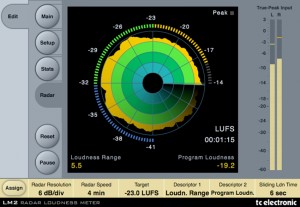
The LM2 Radar Loudness Meter is TC Electronic’s new native plug-in that measures True-Peak and Loudness on stereo tracks in all major DAWs, including Pro Tools.
A dedicated stereo plug-in supporting all major plug-in formats, the new LM2 plug-in features TC’s Radar Display which provides an instant loudness overview, including loudness history, momentary loudness and true-peak metering in a single view.
According to TC, “Whether you are broadcasting for radio and TV, mastering films or involved in Post Production, you’ll find that LM2 is ready to support your work like no other meter.”
The LM2 is reportedly fully compliant with all broadcast standards and will be continuously updated as new standards evolve. Current applications include:
- Broadcast (North America, South America, Europe, China and Japan)
- Commercials and Jingles (North America, South America, Europe, China and Japan)
- iTunes Criteria
- Game Production Criteria
- Delivery for iDevices
- Web Audio Delivery
- CD Mastering
Click for a full list of features. The LM2 plug-in is priced at $199, but has a special introductory price of $99 until June 30, 2012. Click to try the free 14-day demo or purchase.
In March 2012, TC launched the LM6 Radar Loudness Meter plug-in ($599) which provides support for 5.1 surround and includes a log file feature that allows the plug-in to create a text-based log-file stored on the users hard drive or network. Click for more details on the LM6.
Yamaha O1v96i Digital Mixing Desk Review
Here’s a video that takes a closer look at the compact console from Yamaha with built in 16 channel USB audio interface, 40 mix channels and new mic preamps.
The Yamaha 01V96i updates their iconic digital recording console with 16 channels of bi-directional USB audio streaming at an impressive 96kHz. With multi-track recording now de rigueur during live shows, Yamaha once again ups the ante by making recording and playback faster and easier, while supplying full integration with major ASIO and Core Audio DAWs – with just a single connection. Onboard, you get Yamaha’s lauded Virtual Circuitry Modeling technology, giving you warm “analog” effects that are modelled on the actual circuitry of the original units. Bundled with Steinberg’s Cubase AI, Yamaha’s 01V96i is all you need.
Making a beat in a few seconds with WerkBench
Making a quick beat with two drums and a speaking toy. Get WerkBench for the iPad here: http://bit.ly/L6jhd9
DATAMASKIN

