
Indepth demos of the new Arturia Sparkle and Minilab at NAMM 2013
Arturia Minilab is a $99 controller that comes with Analog Factory soft synths and pre-mapped knobs. Sparkle is a hardware controller bundled with their complete Spark drum machine software, and is surprisingly easy to make beats on even for the untrained.
Milton Babbit Reaktor Ensemble
Milton Babbit Reaktor ensemble by Dmitriy Vasiliev, available in the Reaktor user library.
EINKLANG – the most intuitive synthesizer
EINKLANG details below:
After nine years of research and over three years of development, we at Eisenberg are very proud to present EINKLANG, our first software synthesizer. At the moment, we are working on its completion so EINKLANG will be available in stores in early December.
Discover what makes EINKLANG so special and pre-order here at a discount of up to 66% of the retail price:
indiegogo.com/einklang
Free preamp plug-in and a new analog flux synth
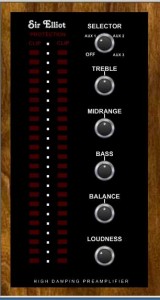
Sir Elliot has released the GPA-2VST plug-in for Windows, a preamplifier described as best suited for jazz, rhythm & blues and lounge music.
Sir Elliot tells us that the GPA-2 is designed to dampen the audio signal and that each Auxiliary input will offer its own tonal characteristic. The new features from the previous model are the following:
- High Damping Factor
- Cross talk
- Output LED Display
- Over Sample Rate Protection
Specifications
- Frequency Bandwidth: +/- 3 dB 22.7 Hz – 22,000 kHz (44.1 kHz – 96 kHz)
- Over Sample Rate Protection: 105 kHz and above
- Cross talk: – 20 dB
- Power Consumption: 7% on a single-core, 3 GHZ, Pentium 4 CPU residing on Windows XP SP3 using a 44.1 kHz white noise audio file.
Pricing and Availability:
Free download
More information:
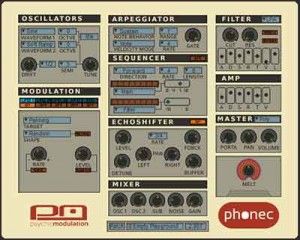
Psychic Modulation tells us that Phonec is best described as an ‘analog flux synthesizer’.
“Inspired by the mystique of video logo synth scores from worn out VHS tapes, Phonec was primarily designed with character in mind. However Phonec is capable of producing a wide range of sounds such as vintage analogue tones, lo-fi synthscapes, ethereal pads, minimal techno sequences, and synthwave leads and basses. Phonec has an intuitive GUI that attempts to strike a balance between form and function, making it a very usable tool that can be a real inspiration to work with. Apart from it’s unique character and smooth workflow, Phonec has several interesting features that set it apart from the crowd.”
Features
- Dual oscillators that can be combined in various ways
- Analog style oscillator drifting
- A unique Melt feature that adds instant character to any patch
- Arpeggiator
- Accent Sequencer
- 3 LFOs (2 monophonic, 1 polyphonic)
- HFO (High Frequency Oscillator)
- 2 Modulation Envelopes
- Echoshifter Delay Unit
- Universal Value Display
- Double Click Parameter Reset
- 128 presets
Pricing and Availability:
Phonec is available for a special introductory price of $34.
More information:
The revolution revealed – new version of Sound Forge Pro
“Coming soon to OS X.”
Sony has released a teaser for a new version of Sound Forge Pro, its digital audio editing software, and the new version is for Mac OS X. Details, including availability and pricing, are still to come – but it’s ‘coming soon’.
Arturia V Collection 3.0 – The ultimate collection returns!
All you can eat analog sounds 
We are introducing a new movie to celebrate the release of the V Collection 3.0, which includes no less than 10 of our finest software instruments. You will be able to witness the off-beat and sometimes surreal world of Wayne, a young aspiring producer, and follow him in his quest to the ultimate sound.
SpectraLayers PRO – new software for audio and video production from Sony
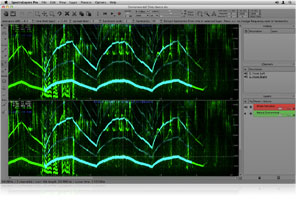
Sony has released SpectraLayers PRO, the newest addition to its line of award-winning software for audio and video production. An intelligent audio editing program, SpectraLayers operates directly on waveform spectra using a wide variety of smart editing tools. Through this application, users can more accurately edit audio by graphically dividing files into discrete, user-defined layers that can be processed independently and reintegrated to achieve flawless master files.
“SpectraLayers introduces an innovative, unique workflow that redefines what can be accomplished in the professional audio editor’s suite,” said Dave Chaimson, vice president of global marketing for Sony Creative Software. “The level of editing precision and advanced capabilities SpectraLayers offers makes it an essential tool for industry professionals who demand the deepest audio analysis tools.”
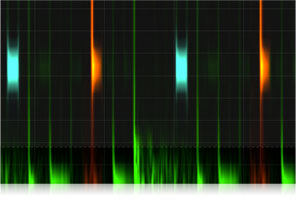
SpectraLayers Offers the Following Transformational Features:
Extreme Audio Editing:
– Divide audio files into discrete, user-defined layers that can be processed independently and reintegrated to achieve perfect master files.
– Remove unwanted noises and artifacts with ease while leaving surrounding audio data completely intact.
– Separate music and dialogue into individual component layers.
– Perform pitch correction on user-selected components of an audio file.
– Employ SpectraLayers in audio mastering, sound design, analysis, and forensics tasks.
– All tools are modifiable using a wide range of user-definable sensitivities and tolerances.
Extraction Tools:
Extract audio into independent layers using intelligent, programmable tools:
– Area — select any audio for transfer from directly within the spectrum graph.
– Frequency — track frequencies and transfer them directly to selected layers.
– Harmonics — seek and select harmonics in user-defined amounts and orders.
Modification Tools:
Operate directly on waveform spectra to perform precise, creative edits:
– Amplify
– Clone
– Erase
Creation Tools:
Create sound directly in the SpectraLayers interface:
– Frequency
– Noise
Fidelity / Flexibility:
– 32-bit 96 kHz capable.
– SpectraLayers provides seamless file transfer to Sound Forge Pro and other audio editing programs.
Dual Platform Support:
SpectraLayers is available for both Mac and Windows platforms.
Price and Availability:
SpectraLayers is now available for purchase worldwide, and online for immediate download at www.sonycreativesoftware.com. Manufacturer’s Suggested Retail Price (MSRP) is $399 USD.
More information: http://www.sonycreativesoftware.com/spectralayersp… .
Analog – new soundset for the Saurus software synthesizer.
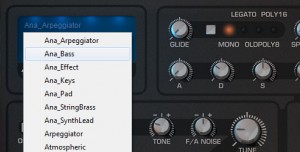
Tone2 has announced Analog, a new soundset for the Saurus software synthesizer.
Taking you on a journey through an analog world, the Analog soundset digs deeper into Saurus’ offerings with a strong emphasis on authentic vintage sounds.
A collection of 200 classic synth sounds including emulations of the Moog, Oberheim, Jupiter, Arp Solina, Clavinet and many others that suit almost every style of Electronic music. Let Analog take you back to a time when these machines were at the center of every studio and now be the source for your creative productions
Enjoy its warm strings, expressive brass, dirty leads, squelchy basses, screaming synths, vibrant pads and just let it inspire you.
Analog for Saurus is available to purchase for 39 EUR.
Teaser – Genome MIDI remix pads
Demo of the ‘Remix pads’ coming in version 1.1.0
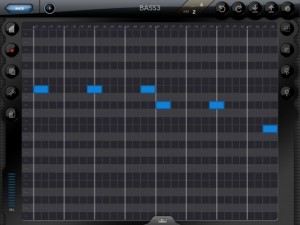
White Noise Software has announced an update to Genome MIDI Sequencer, its software sequencer for the iPad. Here’s what’s new in Genome MIDI Sequencer 1.1.0:
- Fixes for playhead visual positioning issues
- ‘Create’ option for Grooves (create a groove template from a pattern, such as recorded MIDI notes).
- Remix Pads
- File management – Delete, email, Open in… (for opening files in other apps including Dropbox)
- Improvements to Zooming – Zooming in and out should work a little better now in general. When zoomed out, the view now smoothly zooms in instead of abruptly zooming
- New zoom mode. In additioned to the standard ‘fixed’ zoom (where X and Y scale is locked together), there’s an ‘advanced’ mode that lets you zoom X and Y are independently zoomable.
- OMAC App Fast switch – This allows you to quickly switch between compatible apps (not every app supports this yet) via a menu in Genome. The button for this is on the sequencer page.
- Important Change: Genome’s virtual port is no longer ‘on’ by default. You have to enable it via the config menu. The reason for this is that this is a frequent point of confusion for users. Having a virtual port can lead to issues where apps get connected twice (resulting in doubled tempos and other weird cases). It’s only necessary for Genome to have a virtual MIDI port when other apps don’t have one of their own. Only a few apps _don’t_ have virtual ports (such as Animoog), but for the majority of apps you won’t need it on.
- Bugfixes and stability improvements
Not in 1.1.0 but being worked on:
- MIDI Learn (for binding controllers to Patterns and Song steps) – I had wanted to get this in 1.1.0, but there are important bug fixes that need to get out now. This will be one of the first things I implement for the next update.
Check out Ohm Studio – the collaborative music production software
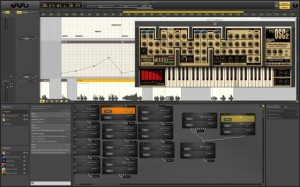
Ohm Force has announced the availability of Ohm Studio, the collaborative music production software for Windows and Mac.
After years of development, Ohm Studio is finally open to anyone for free. Thanks to its cloud-based architecture, the first truly collaborative online digital audio workstation lets Windows and Mac users work together—remotely and in real time.
Ohm Studio covers most of the major features available in modern DAWs, such as audio/MIDI recording and editing, as well as VST plugin support. Moreover, it comes with brand new effect plugins especially designed for Ohm Studio:
- Compressor
- Equalizer
- Filter
- Flanger
- Limiter
- Vocoder
And the famous Ohm Force collection:
- Ohmicide:Melohman (multi-band distortion)
- OhmBoyz (multi-tap delay)
- Quad Frohmage (filter bank)
- Predatohm (multi-band distortion)
- Mobilohm (phaser)
- Hematohm (frequency shifter)
- Frohmage (filter)
- Ohmygod! (comb filter)
- Minimonsta:Melohman (synth, by GForce)
- Oddity (synth, by GForce)
After creating your account on www.ohmstudio.com, access the online server via the Ohm Studio application. You can request to join projects created by other people or start a new one on your own. Once in a project, you can invite other Ohm Studio users or friends with no account to create one and join the project. The interactive interface instantaneously displays every action performed by all members of the project, while the built-in chat eases communication. When the track is done, you can export it to disk or to the project page on the web for showcase.
Beyond the software, Ohm Studio is also a worldwide community of musicians versed in music production. It is the perfect place to create music with bandmates or producers, meet like-minded or different people, find the skills you need and enhance your tracks. In a word, improve your music experience. Ohm Studio offers a modern, efficient, and creative way to make music alone and together.
Still in beta version and constantly updated, Ohm Studio is now ready for massive testing. Don’t miss this unique, time-limited opportunity to try free of charge.
DATAMASKIN

