
Captain Kirk (Star Trek) on new EBM act Blackburner album

Industrial/EDM/dubstep crossover act Blackburner aka Skyla Talon has just released a new album, “Planet Earth Attack” on Cleopatra/Hypnotic Records. The album features guests such as Star Trek legend William Shatner amongst others. The album also features members of Yes. Quite an eclectic bunch you could say.

It’s the second album for the band so far this year after the April release of “Feel the Burn” featuring electronic pioneer Edgar Froese of Tangerine Dream as well as John Wesley of Porcupine Tree.
Producer/musician Skyla Talon first cut his teeth in music with modern metal band Killingbird in 2000, later joining Scum Of The Earth, the side project of Rob Zombie axeman Riggs in 2005. After touring the US with acts such as Hatebreed and Type O Negative, Talon began experimenting with electronic dance music production, inspired by the new sounds in dubstep and glitch music generated by the likes of fellow metal-head-turned-DJ Skrillex.
Via SL
Introducing the Traktor Kontrol Z2: Controllerism
Traktor Kontrol Z2 is the first 2+2 control mixer designed from the ground up for Traktor. Watch it in action in this new 4-deck video — controllist guru Ean Golden performs a chilled-out, downtempo composition, showcasing the all-new Macro FX and Flux Mode in the upcoming Traktor software version, using 2 Traktor Kontrol F1 Remix Deck controllers with the Z2.
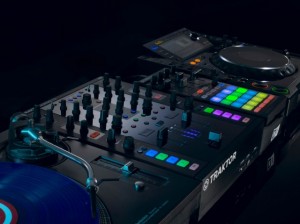
Traktor Kontrol Z2 excels equally as a control hub, or as a standalone mixer, with its aircraft-grade aluminum chassis and rock-solid, ultra-dependable Innofaders™. Step up to the future of mixing — in stores November 1, 2012.
More information: http://www.native-instruments.com/z2-dj-mixer
The features of the Z2:
- Aircraft-grade aluminum – which, by the way, is what we just saw in the DIY Apollo 13 controller yesterday
- Traktor Pro software bundled (and integrated with the controller features).
- Innofader-brand faders, “high-quality” knobs.
- Multi-colored LED buttons, assigned to Remix Decks and cue points. (For those of you who hate the color disco-fication of NI’s hardware, sorry, there’s more.)
- Two standalone mixer channels for external analog inputs – think Pioneer CDJs or turntables.
- Two channels from the soundcard for independent control of the Traktor Remix Decks, cue points, and effects (and, for audio signal, anything you want to route from your computer).
- Dedicated Remix Deck section, and Master section for Traktor file browsing, Sync and Quantize.
- Macro FX, so that you can combine multiple effects on one control. (Also known as “Skrillexing.” Joke. Yes, you can also do classic breakdowns.)
- 24-bit internal soundcard with – at last – XLR balanced outputs.
- Separate booth output, separate mic input. (This is a DJ mixer, after all.)
- Additional aux input, atop the turntable connections. (iPad, perhaps?)
- HID controller implementation.
- USB hub
DSI Mopho x4 Demo with Peter Dyer
Checking out the Dave Smith Mopho synth, details below:
Special thanks to Peter Dyer! Peter Dyer plays keyboard for Mariah Carey, Aloe Blacc, Van Hunt, and others. More info at: www.peterdyer.net. Available in 1080p HD. Peter demonstrates some Mopho x4 factory sounds. Drums provided by Tempest, some effects used where noted.
Noisepad V2.0 Tutorial
NOISEPAD
Noisepad is a user friendly drum computer, sequencer and beat creator made specifically for live performances and instant result.
It has been designed to give you the most functionality and fun without having to go through a steep learning curve. After installation you’ll find 5 preloaded soundbanks of 12 samples each, ready to start the beat making. You’ll be bouncing your head within 5 minutes, that’s a promise!
The onboard sequencer allows you to program up to 12 patterns on-the-fly, each with their own duration (1 — 99 bars). Switching between patterns is seamless; the sequencer makes sure the next pattern starts when the current has finished. Apply effects to the pattern, mute samples or have them playing solo on your command. Adjust the Beats Per Minute with precision or by tapping at the speed of the beat and add a bit of swing to make the beat feel just right.
It adds a new dimension to your live-sets, parties and all places where you want to make noise. Synchronize the BPM with the music you’re playing and add a little bit of your own flavor to it, or simply trigger the samples by hand. Real-time effects such as pitch, delay, cut-off, phase, reverb and bit-crush will bring your noise to life.
Organize the samples into your own custom soundbanks using the built-in organizer. Once you’re done playing with the packaged samples, the in-app shop provides additional soundpacks to discover or you can load your own samples using iTunes File Sharing for unlimited possibilities.
Noisepad v1.0 was released in 2011 by iPhonk a division of MediaGROE BV
WHAT’S NEW
version 2.0
Organize samples
– Organize samples into Soundbanks, drag ‘n drop them onto buttons and swap them around
– Create as many Soundbanks as you like
– Overview of all Soundbanks, purchased Soundpacks and custom samples
– Rename or remove Soundbanks
– Rename user samples
Sequencer / Record
– Real-time sequencer: record your beats on the fly
– Record up to 12 patterns, each with own variable length (1 – 99 bars)
– Export pattern to WAV file
– Erase single instrument from pattern or the whole pattern at once
– Switch seamlessly between patterns: the next pattern is started after the current finishes
– Copy / Paste patterns to other slots by holding the pattern button
– Configurable BPM and Swing
– Tap button to adjust BPM easilly
– Toggle FX: effects applied to both pattern + tap pads or only tap pads
– Jam with the tap pads while the pattern repeats
New Soundpacks in the shop
– Bong-ra Hardcore
– Bong-ra Drum ‘n’ Bass
– Bong-ra Dubstep
– Loopbased We Love 808
– Loopbased Dirty South Flava
Other
– Two new *free* preloaded soundpacks
– Hold: press down starts sample, release stops it
– Set the volume of each sample individually
– Mute individual samples or let one sample play solo with a single button press
FEATURE LIST
Soundbanks
- Each bank holds 12 samples
– Load unlimited samples, switching between banks doesn’t stop samples
– User samples: Use file sharing in iTunes
( .caf / .wav / .mp3 / .aif audio files, 22khz / 44khz / 48khz, stereo/mono )
– Organize samples into Soundbanks, drag ‘n drop them onto buttons and swap them around
– Create as many Soundbanks as you like
– Overview of all Soundbanks, purchased Soundpacks and user samples
– Rename or remove Soundbanks
– Rename user samples
Shop - Buy Sound Packs from various artists / producers for just $ 0,99 cent per pack.
Sequencer
- Play: real-time sequencer
- Rec: Record your beats on the fly
– Metronome: keeps you on-beat while recording
- Effects: Toggle effects on/off for patterns
- Pattern: Record up to 12 patterns, each with own variable length (1 — 99 bars)
- Erase: Single instrument or pattern
– Hold patterns for 2 sec. to copy and / or paste pattern
Rhythm settings
- BPM: Set BPM manually
- Tap: Tap button for BPM
- Bars: Each pattern has variable length (1-99 bars)
- Swing: Set amount of swing (0% – 100%)
Export/Import
– Export individual patterns to a .wav file
– Share samples/patterns between apps with AudioCopy/Paste
Sample settings
– Cut: Triggered sample cuts previous sample
- Hold: Press down start / release stop sample
- Volume: Set the volume for each sample
- Mute: Mute individual samples
- Solo: Play a sample solo
- Mic-in: Record mic-in audio for sample *soon available*
Effects panel
- Pitch: Slide bar from 0% to -100% or +100%.
- Delay: Slide bar from 0% to 100%
- Reverb: Slide bar from 0% to 100%
- Cut-off: Slide bar from 0% to 100%
- Phase: Slide bar from 0% to 100%
- Crush: Slide bar from 0% to 100%
- Dry / wet: Set effect strength from 0 t
Ocelot – Beyonica
Live performance duel featuring a grid of squares that come from the monome and Ableton Live; as well as the Akai MPC and effects pedals.
FREE MUSIC FROM OCELOT available for a limited time here >>>> soundcloud.com/o-c-e-l-o-t
Polymoog 203a Vintage Analog Synthesizer
Background video description:
Recorded / improvised with my Roland CR-68 (Compu Rhythm) on minimal setting.
From the Polymoog I had the direct output and resonator outputs fed into my Behringer mixer while the VCF output was fed into my Ibanez UE 305 with Analog Chorus,Delay and Compressor all engaged and output back into my cruddy mixer.
I was obviously tweaking the sound in spots… Most notably the VCF Cutoff and sometimes S/H rate etc. Towards the end, or somewhere in the middle I brought down the release for a more plucky sound while the lower half of the Polymoog had a bit more sustain… Unfortunately I recorded this to digital (Tascam DP01FX) It sounded much nicer through my Tascam 688 Cassette 8-track but then I couldn’t transfer it to this media from there. Also, my Polymoog is only offering out Square waves at this time or else it would have sounded even way more complex and OTHERWORLDLY!!!
I have a feeling the Blondie and Gary Numan mostly used just Squarewaves anyway for their string sound… Though ealy 70’s Ultravox relied more heavily on the deeper and fat sounding Polymoog sawtooth waveforms…
Nord Factory Tour – Building a Nord Electro
Get a glimpse of the factory in Stockholm where all Nord keyboards are made…
Clavia have released a short video offering a glimpse inside their Stockholm factory where all Nord keyboards are handmade. The video shows the manufacturing process and stringent quality controls as a Nord Electro 4D is put together.
Highlighted are some of Nord’s unique practices and attention to detail throughout the manufacturing process. For example, one section of the video shows Nord’s heat room in which every Nord keyboard is placed once fully assembled. Each keyboard is tested for 48 hours running continuous CPU tests at 40 degrees centigrade to simulate the most challenging of stage environments.
Music by Federico Solazzo (http://www.federicosolazzo.com/).
All sounds except drums from the Nord Stage 2 and Nord Wave.
Thanks to Hasse & Lasse (http://www.hasseochlasse.se) for making the video!
Official Website:
http://www.nordkeyboards.com
Checking out the TRAX RetroWave MIDI-Controlled Analogue Synthesizer, Monophonic Synth
The TRAX RetroWave desktop monosynth was designed for musicians who want the warmth and raw power of classic analogue sound, created by a real analogue instrument, as opposed to a digital system or computer emulation. This compact unit is great for use in studios, with your home computer programs, in live performances, and for creating sound effects for film, TV and theatre.
In this video, you will hear just a small selection of the sounds the unit is capable of – many others are available, and some no doubt have yet to be discovered!
The opening title music was created by setting the filter to oscillation mode, and tuning it to play along with the VCO, effectively giving a two-note chord.
Features include:
True analogue oscillators, filter, sample and hold, noise generator, VCA and signal path
Log VCO with square, ramp, triangle and sine outputs, and PWM control of square wave
24dB/octave, 4-pole lowpass filter with oscillator function, log response
Two triangle and square Low Frequency Oscillators with waveshape controls
Built-in MIDI to CV unit, with 5V gate and velocity output, 1V/octave CV response
Built-in overdrive circuit for epic distortion effects
No menus, no software, just switch on and play
Supplied with 1/4″ patch and output jack leads
KeyboardFantasy – demo ony by one
David Baron goes through keyboards one by one. Yamaha Piano, Elka Synthex, Glockenspiel, RMI Electrapiano, Roland System100, Arp Omni 2, Korg PS-3200, Celesta, Korg MS-20, Oberheim 4-Voice, Multivox MX3000, Oberheim OB8, Moog Minimoog, Synton Syrinx,Moog Vocoder.
Vocodrone
Featured instruments in this video:
Alesis Metavox & 3630
Buchla 292e
Line6 FilterPro
Moog CP251 FreqBox MP 201
Oberheim Sem
Roland SVC-350
Logic Ultrabeat Drum
DATAMASKIN

